(Note: If you are unsure what Mac OS you are using, click the apple on the upper left hand corner of your Desktop window, and go to the option, "About this Macintosh", or "About this Computer". A new window will open, and will have the System Software version number.)
We suggest that you print this page out if possible so that you can have the instructions in front of you as you make the change. Click here for a printer friendly version of this document.
The new DNS numbers are:
Primary DNS Secondary DNS |
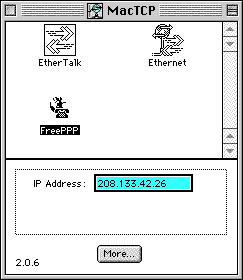
1. Under the APPLE MENU, select CONTROL PANEL, then MACTCP.
2. Now click on the button marked MORE.
3. Locate the section of the new screen that looks like:
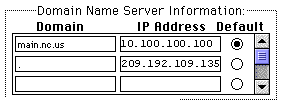
and delete any old numbers that appear, replacing them with the new ones listed above.
4. Click OK and close the MacTCP screen.
You have now successfully changed your DNS settings. If you have any questions or problems, please contact help@main.nc.us.